


Resources - Archiving & Storage Whitepapers - Blu-ray Disc FAQS
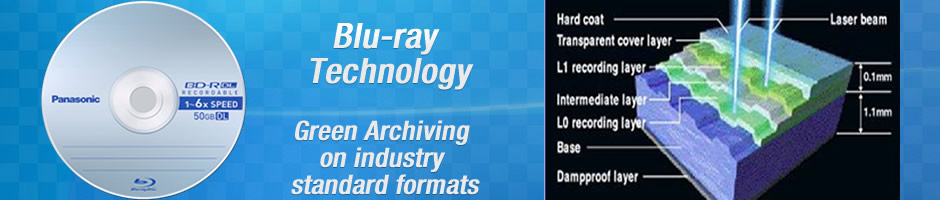
Blu-ray Disc (BD) is the next-generation optical disc format. The benefit of using a blue-violet laser (405nm) is that it has a shorter wavelength than a red laser (650nm), which makes it possible to focus the laser spot with even greater precision.
This allows data to be packed more tightly and stored in less space, so it’s possible to fit more data on the disc even though it’s the same size as CD/DVD. This together with the change of numerical aperture to 0.85 us is what enables Blu-ray Discs to hold 25GB/50GB.
Blu-ray Disc types come in two versions: single layer and double layer. A double layer disc may hold up to twice the amount of data or video compared to a single layer disc, and uses two independent layers placed on one side of the disc to store its information. A single-layer disc holds up to 25 gigabytes, while a double-layer disc holds up to 50 gigabytes of data, without the need to flip the disc.
Blu-ray Disc format is easily extendable (future-proof) as it includes support for multi-layer discs. This allows the storage capacity to be increased to 100-200GB in the future simply by adding more layers to the discs.
First generation drives are 2x (72Mbps), as BD-ROM movies require a minimum data transfer rate of 54 Mbps. Blu-ray also has the potential for much higher speeds, as a result of the larger numerical aperture (NA) adopted by Blu-ray Disc. The large NA value effectively means that Blu-ray will require less recording power and lower disc rotation speed than DVD and HD-DVD to achieve the same data transfer rate.
While the media itself limited the recording speed in the past, the only limiting factor for Blu-ray is the capacity of the hardware. If we assume a maximum disc rotation speed of 10,000 RPM, then 12x at the outer diameter should be possible (about 400Mbps). Constant innovations in terms of drive speed and capacity confirm the promise of this evolving technology on a continuous basis.
The development of new low-cost hard-coating technologies has made the use of cartridges obsolete. Blu-ray will instead rely on hard-coating for protection, which when applied will make the discs even more resistant to scratches and fingerprints than today's DVDs, while still preserving the same look and feel.
Blu-ray also adopts a new error correction system which is more robust and efficient than the one used for DVDs.
Tests show that BD-R media are extremely suitable for long-term archival storage purposes. In a typical office environment (normal room conditions), the projected archival lifespan is at least 50 years. (Source Panasonic).
Archiving News
DAX launches multi-platform File and Folder Archive Software. Read more>>>
Archive Automation
Archiving is not the same as making back-ups and should form an essential part of your storage & retrieval processes. Read more>>>
Solutions Overview
Archives for specific workflows: Email Archive, Prepress Archive, Medical Archive, Broadcast Archive and File & Folder Archive. Read more>>>
DAX On-Line Archive
Discover the simplicity of archiving & back-up with the affordable DAX On-Line Archive. Read more>>>
Customer Challenge
De Schutter ´Neroc archives automatically all email and data related to their prepress workflow. Read more>>>